Chroma key, commonly referred to as green screen or blue screen, is a video editing technique that involves digitally removing a specific color—usually green or blue—from footage using keying methods. Keying allows for the placement of a different background or visual element in the scene. It is a popular method for creating visual effects and integrating various elements within a shot. The technique is most widely recognized as “green screen removal.”
It allows you to make a colored background (usually green or blue) transparent by using an alpha channel so that another image or video can be placed behind the subject. Chroma keying evolved from early analog film tricks into a digital essential in modern filmmaking, enabling limitless creative possibilities in visual effects (VFX). It was used in classic films like Ben-Hur and Mary Poppins. The Matrix, Star Wars, and the Marvel Cinematic Universe heavily relied on chroma keying. In 1933, RKO Pictures employed blue screen compositing in The Invisible Man to create vanishing effects.
Chroma keying works based on color separation — the ability of digital systems to identify and isolate a specific color range (usually green or blue) and make it transparent, so another image or video can be composited into its place. Digital images and videos are made up of pixels, and each pixel contains different color information. These colors are usually stored in the RGB color space: R = Red, G = Green, B = Blue. Software analyzes the RGB values of each pixel. If a pixel matches the target chroma key color (e.g., green with values like R: 0, G: 255, B: 0), it’s flagged for removal. Human skin tones contain very little green or blue, so subjects separate well from those backgrounds. Digital cameras are more sensitive to the green spectrum, resulting in a higher luminance in the green channel. Blue is used when the subject is wearing green. In low-light or nighttime scenes (blue is less reflective). The software doesn’t just remove one shade of green or blue — it removes a range of similar colors (called the tolerance or threshold). Chroma keying often works in HSL or HSV color space for better control over these components. This alpha matte is used to layer the subject over a new background. When light from the green screen reflects onto the characters or subjects, a green "spill" can appear on their skin or clothing.
Both green and blue screens are utilized in chroma key, with each having unique characteristics that make them more suitable for different situations.
Brighter and more reflective, less light is needed to achieve a clear key. Most digital cameras are more sensitive to green, resulting in sharper edges and less noise grain. Green is less common in wardrobe and props, especially in sci-fi and fantasy (e.g., no natural green hair or skin). However, green reflects more easily, which can cause color spill on the subject (especially on skin, hair, or shiny objects).
Lower reflectivity leads to less color spill. They are ideal for low-light scenes or nighttime shoots (as they do not bounce light as much). Blue screens work better for fine details like hair or translucent objects (e.g., glass, smoke, motion blur). They require more lighting to match the brightness levels necessary for clean keying. Many costumes, especially denim or uniforms, contain blue, which can complicate keying.
Opt for green when your subject (characters) is dressed in blue clothing or utilizing blue props. This strategic choice is especially effective in low-light or dark scenes, during outdoor shoots in daylight, and it significantly enhances detail in hair and motion blur. By incorporating green, you elevate your visuals and create a striking contrast that captures attention and adds depth to your imagery, and to minimize color spill/reflection. Green screen offers a fast VFX workflow and simplifies digital compositing.
Marvel Cinematic Universe – Used extensively for superhero scenes, cityscapes, and CG environments. YouTube and streaming – Favored for vlogs, live streams, and tutorials due to ease of use and low lighting needs. News and weather broadcasts – Allow quick, real-time keying with simple backdrops. Blue screens were used for flying and dark environments in the Harry Potter films. The underwater scenes benefit from the effect of water and the natural blue color mixing with light. Older Hollywood films (pre-digital) – Relied on blue screen due to better performance with analog film.
Chroma keying, or green/blue screen technology, is used far beyond Hollywood blockbusters. It's a versatile tool in film, broadcasting, and content creation. This technique is a cornerstone of modern visual effects (VFX) in both movies and TV shows.
Creating fantasy worlds, space scenes, or period environments. Simulating dangerous or impossible locations (e.g., cliffs, war zones, deep space). Wire removal, stunt doubling, and background replacement. Avengers: Endgame – CG environments and portals. Step into the exciting world of Game of Thrones! Get ready for some amazing battle scenes and stunning dragon flights that will take your breath away.
Advance your vlogs, tutorials, and web series with stunning custom set extensions that transport your audience straight into the heart of the action. Get ready to enhance your content and captivate your viewers like never before! Adding fun effects or virtual environments to comedy or educational content.
Educators use green screens to appear next to graphics or slides. News forecasters stand in front of green screens displaying dynamic maps, animations, and forecasts. News anchors use virtual sets created with chroma keying to simulate high-tech studios. Game developers and production teams use chroma key in motion capture and performance capture for character animation. Virtual production stages (like those used in Unreal Engine) combine chroma key and LED screens for real-time digital environments.
Chroma keying can be done with a wide range of software — from beginner-friendly apps to high-end professional tools used in blockbuster films and live-action broadcasts. Here’s a breakdown of popular options, hardware needs, and which tools are best for different skill levels.
While chroma keying itself doesn’t require supercomputers or workstations, smooth performance depends on the resolution, layers, and effects being used.
Adobe After Effects is one of the most powerful tools for chroma keying in visual effects. Follow these steps to remove a green or blue screen background and composite your subject over a new scene.
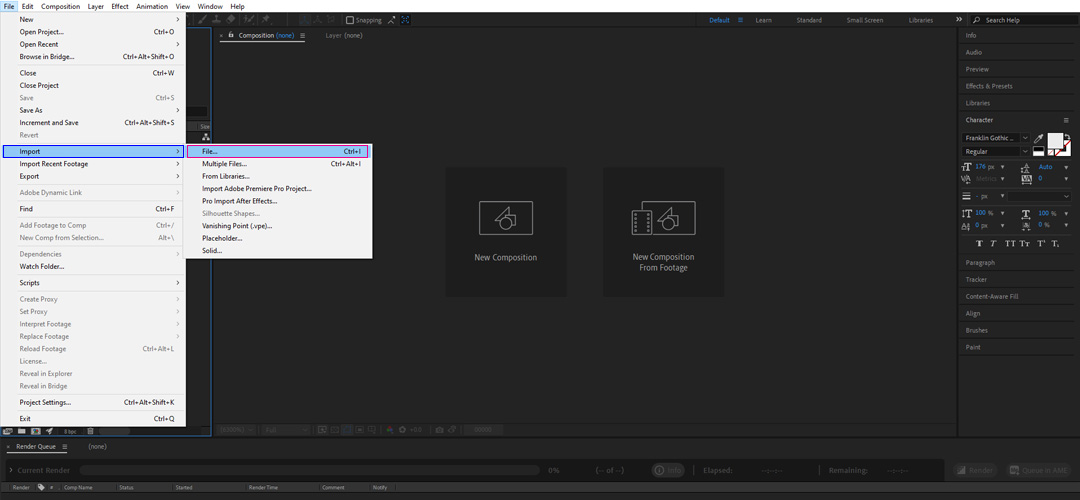
Go to File > Import > File and select your green/blue screen video.
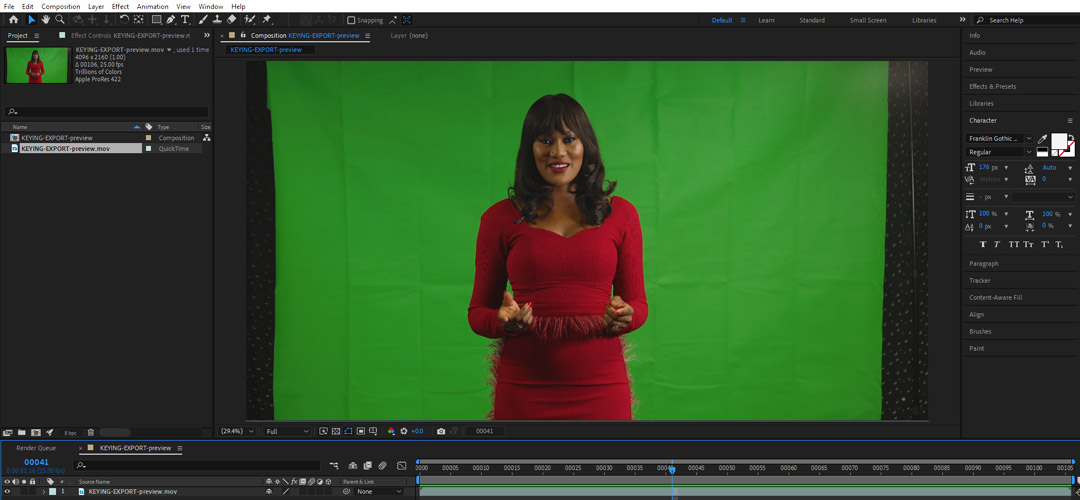
Create a New Composition after importing the sequences or video footage.
Go to the Effects & Presets panel. Search for "Keylight (1.2)" — it’s a built-in effect. Drag Keylight (1.2) onto your video layer.
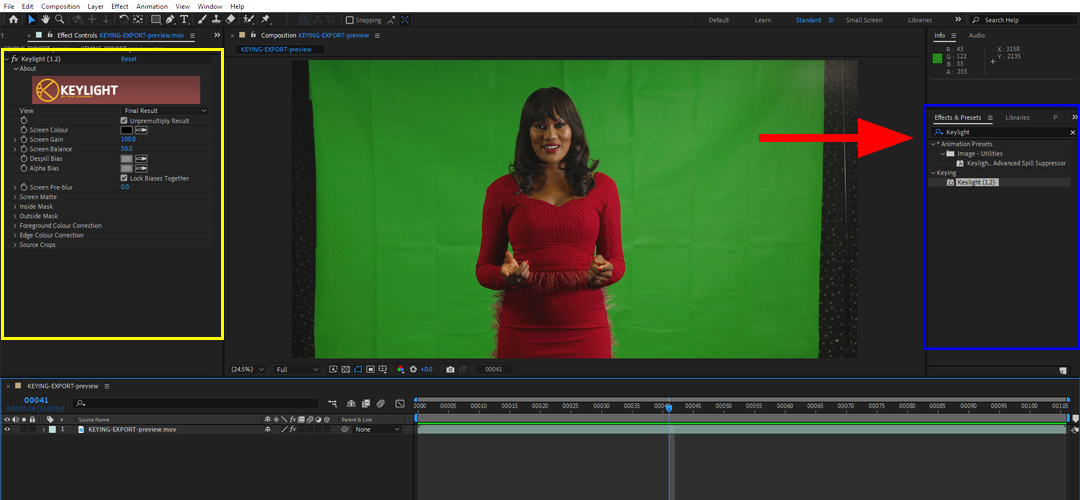
Use the eyedropper tool to click on the green or blue background in your footage. The background will disappear and become transparent.
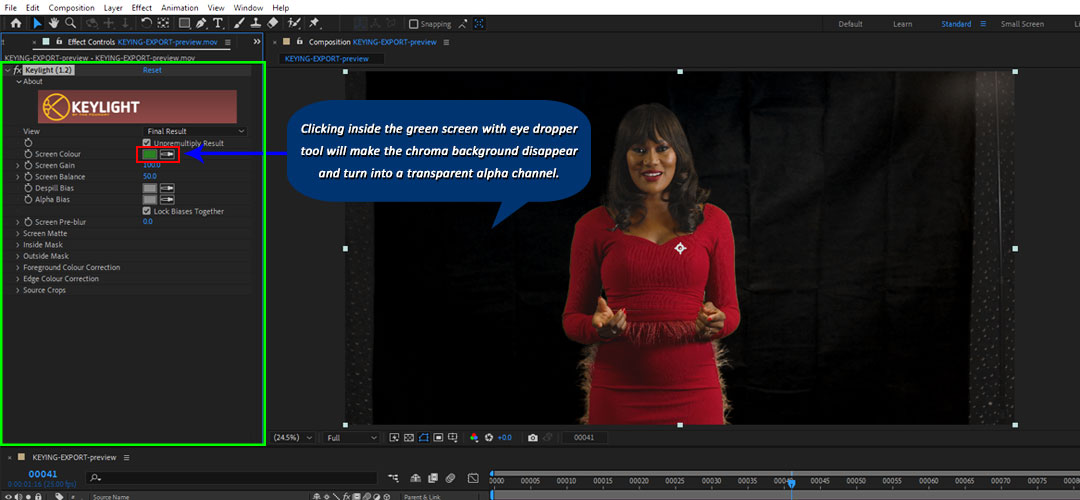
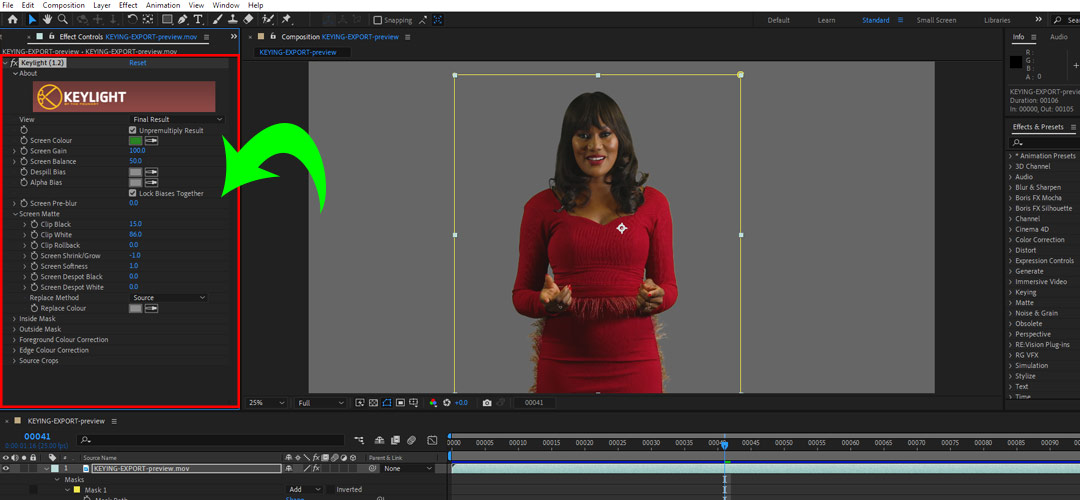
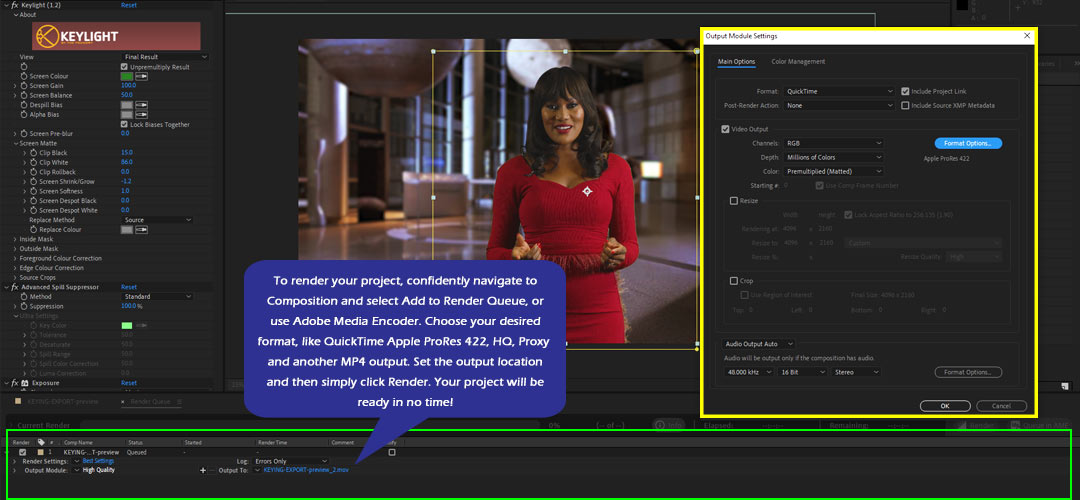
Refine the Key: Screen Gain, Screen Balance, Clip Black / Clip White,, Screen Shrink/Grow, Screen Softness. Use these settings in the Keylight panel.
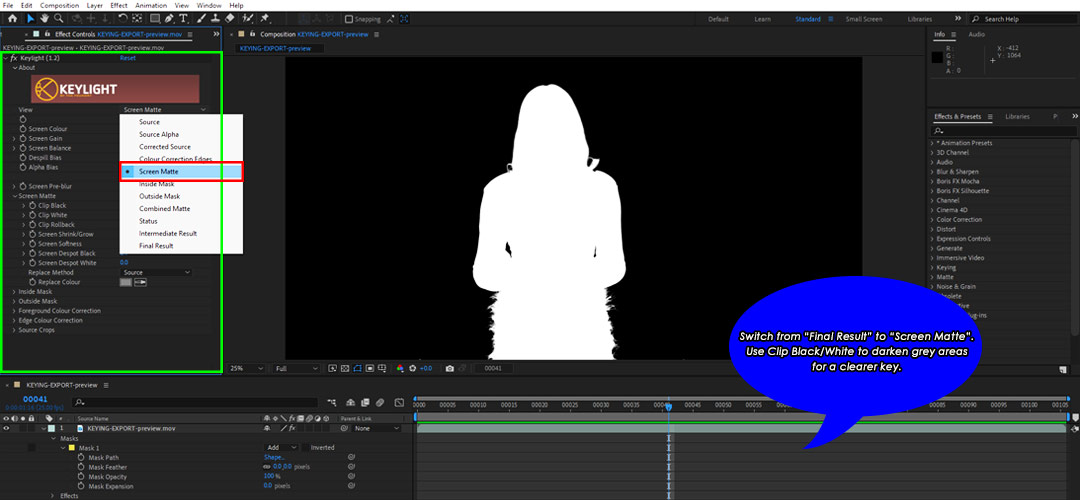
Change your view mode from "Final Result" to "Screen Matte". Use Clip Black/White to push gray areas to solid black or white for a cleaner key.
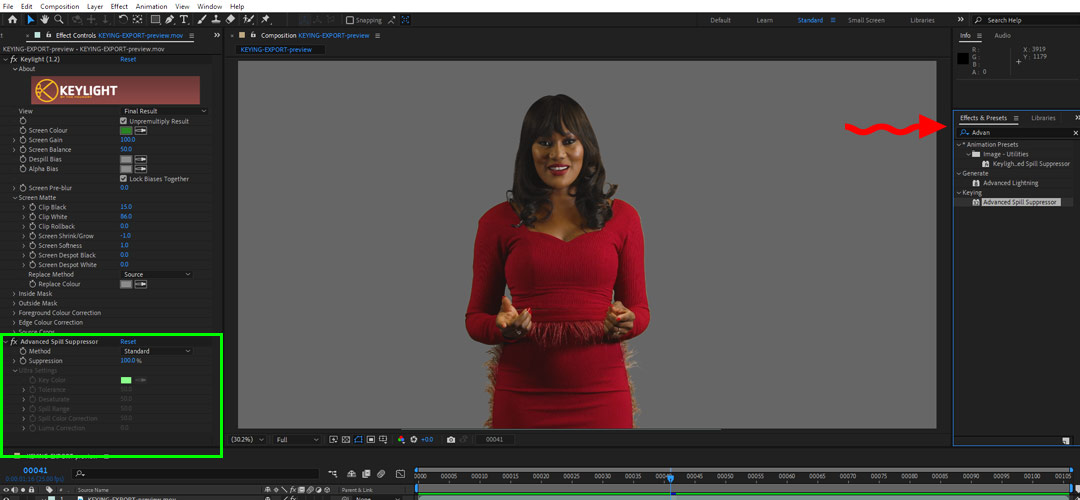
If green or blue edges are visible on the subject, in the Keylight effect, enable or adjust "Advanced Spill Suppressor". Or apply "Spill Suppressor" from the Effects panel manually.
Import the new background image or video. Drag it below your keyed footage in the timeline. Resize or reposition if needed to match perspective and framing.
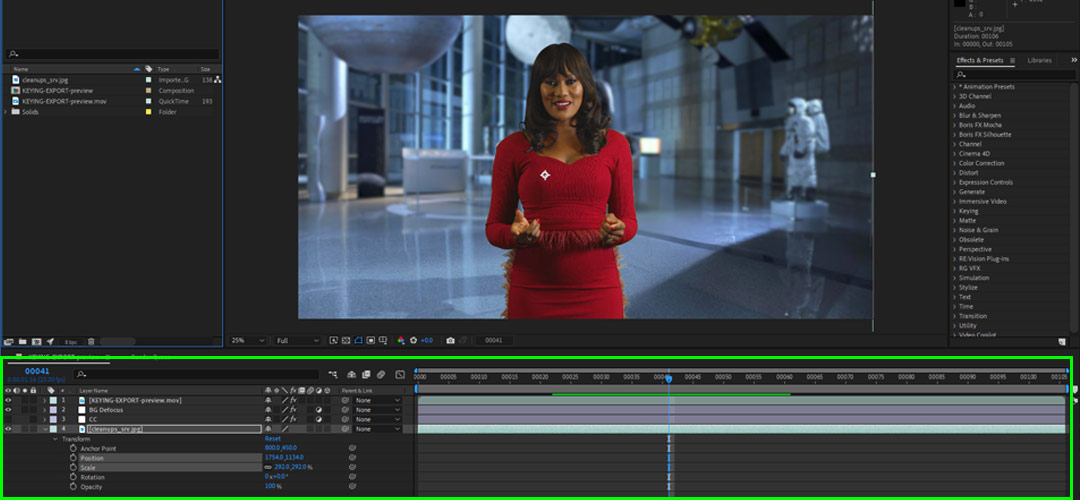
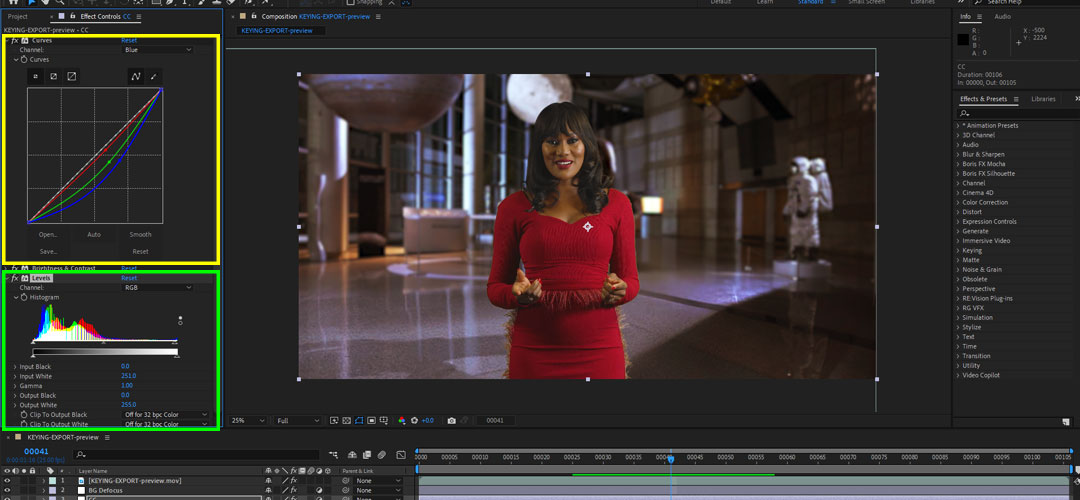
Use Color Correction (Curves, Lumetri, Levels) to match lighting and tones between the subject and the background. Add shadows or camera blur (Fast Box Blur, Gaussian Blur) to make the composite look natural.
Go to Composition > Add to Render Queue or use Adobe Media Encoder. Choose any format (e.g., H.264 for MP4 output). Set your output location, and click Render.
With great software like After Effects or Premiere, chroma keying can fall apart if the source footage isn’t prepped properly or if keying settings are misused.
Chroma keying (green/blue screen) is a cornerstone of modern video production, not just for VFX-heavy blockbusters, but for creators at every level — from indie filmmakers to YouTubers. Here are the key advantages:
You can use any solid color chroma key in video editing or compositing software, and rotoscoping will be a must. However, green and blue are the industry standards for very good reasons.
Green screen (chroma key) editing may seem complicated at first, but with today's software and tools, even complete beginners can achieve clean, impressive results. The key is to know what to avoid and to use the right tools for your skill level.
If you're seeking to do green screen or chroma key editing without any cost, you're fortunate. Many high-quality, free video editors now provide advanced chroma key tools — ideal for beginners and even some professional use.
Yes, absolutely! Many modern mobile apps, such as CapCut, KineMaster, VN Video Editor, iMovie, and PowerDirector, now support chroma key (green/blue screen) editing directly on your iPhone or Android device. You can easily shoot, edit, and replace backgrounds right from your phone or tablet. For high-quality results, it is important to use industry-standard software.
Chroma keying isn't just a special effects trick — it's a transformative tool in modern visual storytelling. Whether you're making a Hollywood-level film, a YouTube reaction video, or a weather forecast, chroma key opens up unlimited creative potential with minimal setup.